
How credits work
Cyberbard has no subscription. You pay with credits, and the same credits are used for everything. You only spend them when you choose to do something.
What costs what
| Action | Cost |
|---|---|
| Free credits when you sign up | +3 |
| Create a project (includes its first test) | 1 credit |
| Unlock a report | 3 credits |
| Retest an unlocked report | 3 free within 30 days, then 1 credit each |
| New test on a project | 1 credit |
| Scheduled test (every two weeks) | 1 credit each |
Credits never expire.
Free sign-up credits
Every new account receives 3 credits. That is enough to test up to three websites. Creating your first project uses one of them.
If several accounts were created from the same network or browser, the free credits may not be added. You can still buy credits at any time.
When credits are returned
If a test fails, the credit is returned automatically:
- If creating a project fails, you get the credit back.
- If a retest, new test or scheduled test fails, you get the credit back.
Your Credits page in Settings shows each refund as its own line, such as Refund: test failed.
What unlocking gives you
Unlocking a report costs 3 credits once per report and you keep it. It includes step-by-step fix instructions, the Growth Plan, PDF export with your logo, and Retest. The full list is in What unlocking a report includes.
Check your balance and history
Click your name at the top right, choose Settings, then Credits. You see:
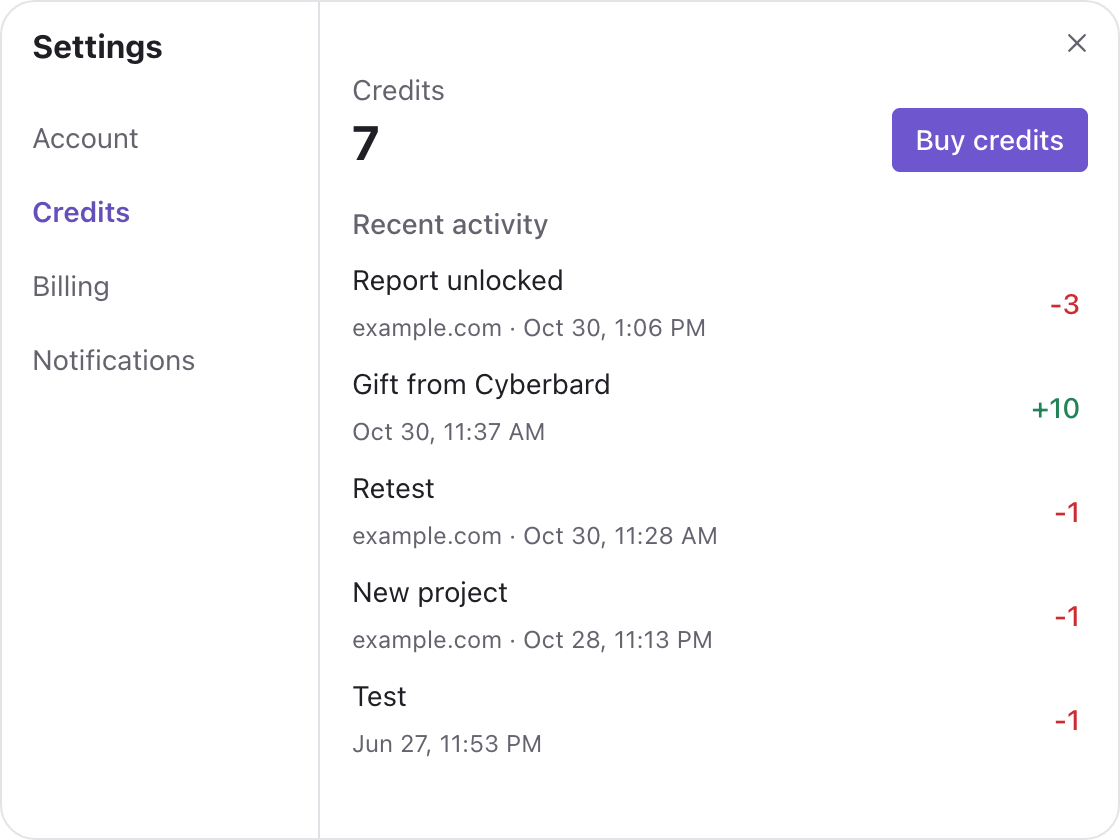
It shows:
- your current number of credits,
- a Buy credits button, and
- Recent activity: every credit you gained or spent, with the website and the date. Names include Welcome bonus, New project, Report unlocked, Retest, Scheduled scan, Credits purchased, Gift from Cyberbard (credits we added to your account) and refunds.
Running out of credits
When an action needs more credits than you have, its button changes to Get credits and a window shows how many are missing. After you buy a pack you return to the page you were on and can continue.
Scheduled tests never go below zero. They pause until you add credits, then continue. See Scheduled tests.
Buying more
See Buy credits.
Related articles
- Buy credits — Credit packs, prices, how payment works and where to find your payment history.
- What unlocking a report includes — What you can use for free, what 3 credits unlock on a report, and what happens after 30 days.
- Scheduled tests — Let Cyberbard re-test your website every two weeks and email you what changed.