
Project trends
Your project page shows how things change from one test to the next, so you can tell whether your work is paying off without comparing reports by hand. Open it by clicking your project on the Projects page, or by clicking Trends at the top of a report.

The left side shows your project, with Retest and Schedule buttons, and the Test History: your latest reports, each with its score, its label (such as Good or Fair) and its date. Click one to open that report.
Latest changes
After each test, the Latest changes section lists what moved since the previous test:
- Score drops, so you see a problem straight away.
- New issues, such as a setting that now blocks an AI crawler.
- Resolved issues, the fixes that worked.
Click View or View fix next to a change to go straight to the report or the fix involved. After your very first test there is nothing to compare with, so the section says so. Changes appear after the next test.
AI readiness score
The main chart plots your AI readiness score (out of 100) over time. You can:
- Switch between Chart and Table view.
- Choose a time range of 3 months or 6 months.
- Turn on the 4-test average line to smooth out small ups and downs.
- Click a point to open the report from that test.
Marks on the chart
| Mark | Meaning |
|---|---|
| Hollow point | The test was not compared with earlier ones because some data was missing. |
| ✕ | A test that failed, or a scheduled test that was missed. |
| Rules updated | Our scoring changed. The change may not be about your website, so that test is not compared with earlier ones. |
| Some data missing / Limited data | Part of the information could not be collected, so treat the score as a rough guide. |
Score breakdown
Below the chart, a card for each area shows its score and a small sparkline: Technical, Schema, Citability, Platforms and Content, plus Brands when it could be measured. The areas that dropped come first, then the lowest scores.
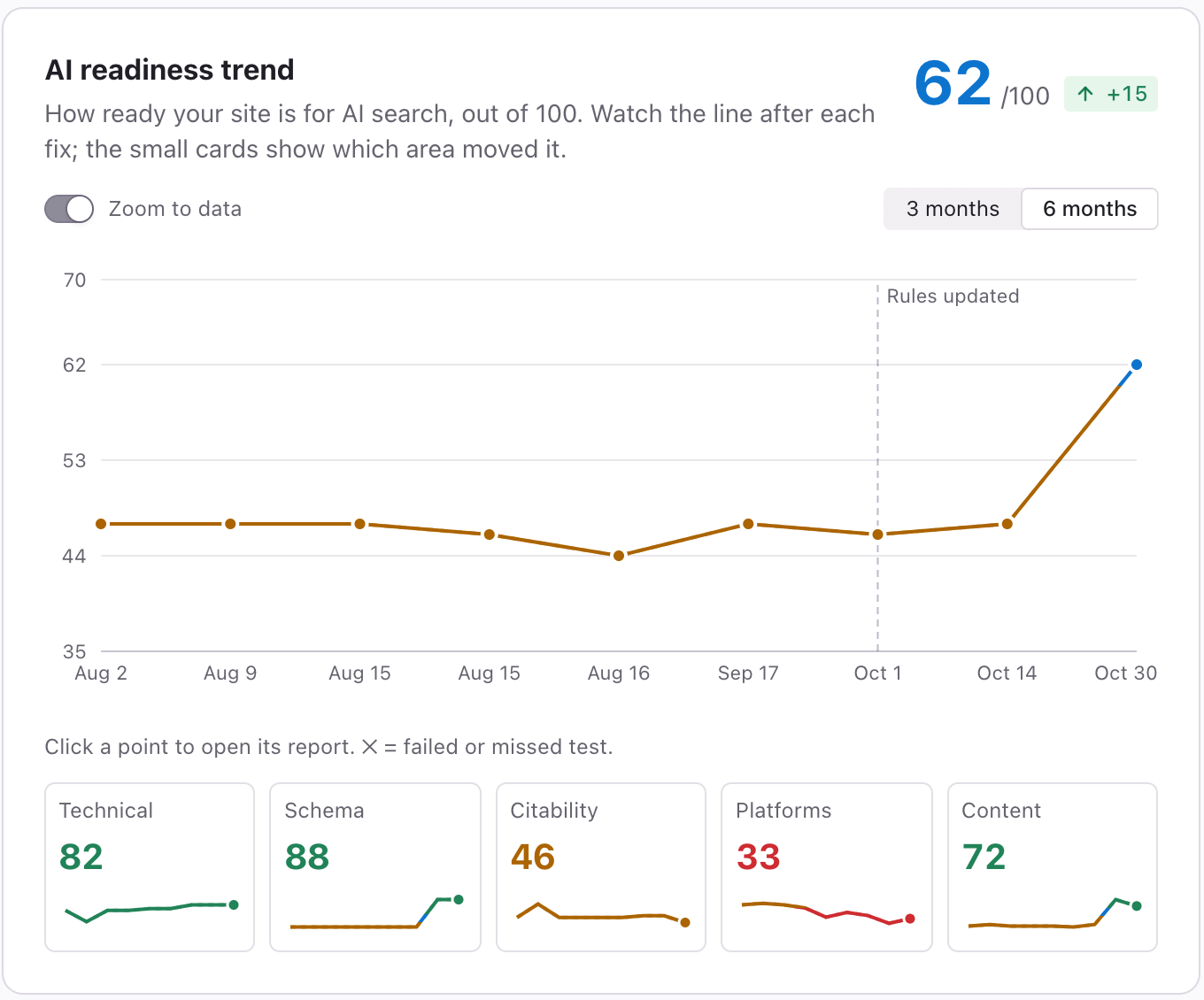
Click a card to show that area's own trend in the main chart. Click See why & how to fix to jump to the explanation in the report. What each area means is covered in AI readiness score and Audit.
AI visibility and AI citation
Two more charts, both out of 10, come from real AI answers:
- AI visibility trend: how often AI assistants recommend you.
- AI citation trend: how much AI assistants cite your pages as a source.
They show Not measured yet until a test has asked AI about your market. Because AI answers vary, these charts can wobble from one test to the next. Look at the direction over several tests.
Schedule details
The project page also shows the date of your last test and the next scheduled test, and lets you start or pause scheduled tests. See Scheduled tests.
Tips
- A single test tells you where you are. Three or four tell you where you are going.
- If the line dips after you changed something on your website, open Latest changes to see what the change was.
Related articles
- Scheduled tests — Let Cyberbard re-test your website every two weeks and email you what changed.
- AI readiness score and Audit — What your score out of 100 means, which areas it covers, and how to read the Audit tab.
- Fix Plan — How the Fix Plan is organised, what free and unlocked fix guidance include, and how to work through it.