
AI readiness score and Audit
The AI readiness score is a number from 0 to 100 that rates how ready your own website is for AI search. It looks at things you control: whether AI can read your pages, how clearly your site explains what you offer, and whether your content is easy to quote.
The score is about your website, not about how often AI recommends you. How often AI names you is shown separately by the AI visibility score. See The Summary tab.
What the score means
| Score | Label | Meaning |
|---|---|---|
| 70 and above | Excellent | Your site is in good shape for AI. Focus on staying there. |
| 60 to 69 | Good | Solid, with some gaps worth closing. |
| 40 to 59 | Fair | Real gaps are holding you back. The Fix Plan will help most here. |
| Below 40 | Low | AI is likely struggling to read or trust your site. Start with the top fixes. |
The areas
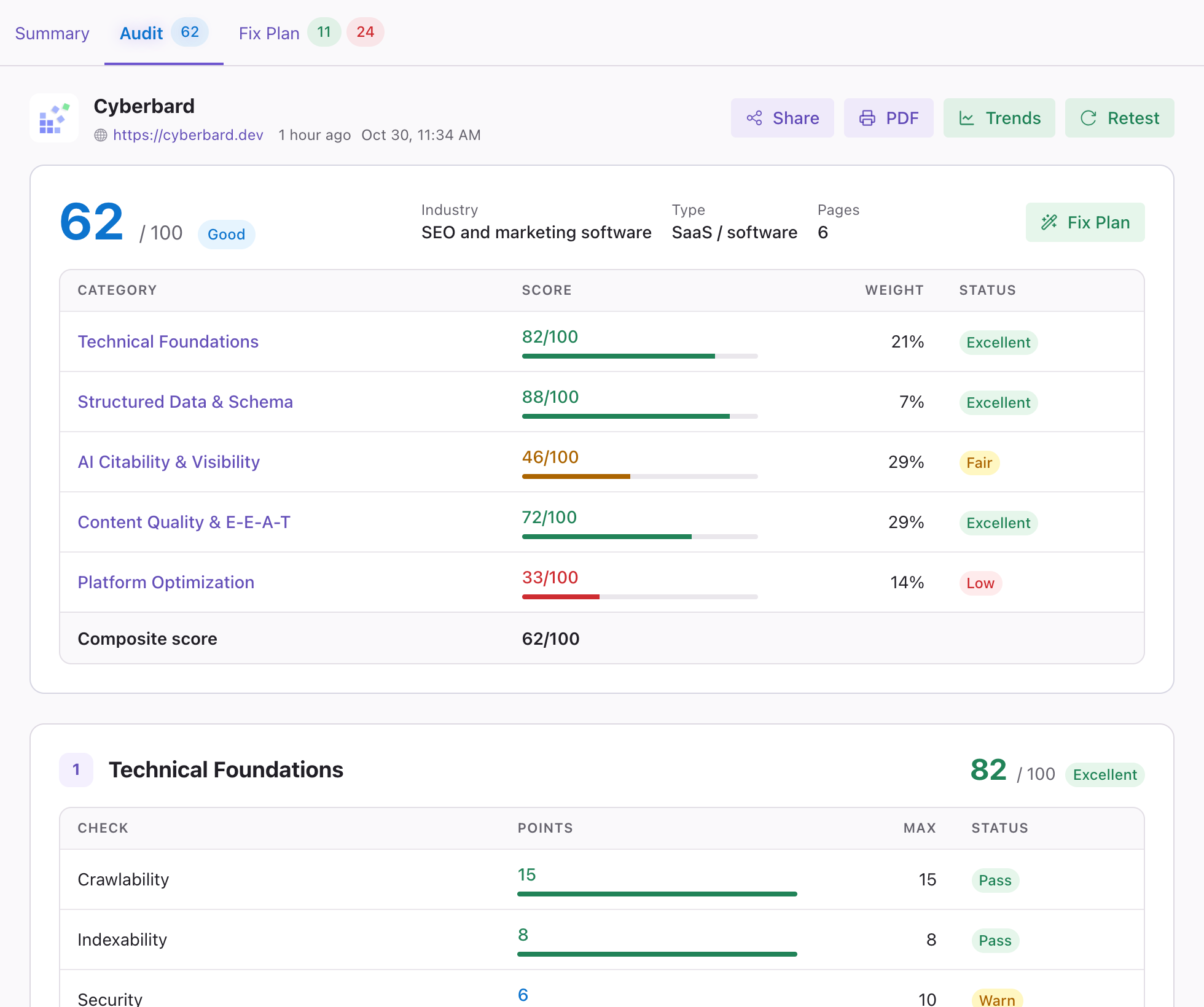
The Audit tab opens with your overall score, the kind of site it found (industry and type) and the number of pages it read. Below that, a table shows the areas your score is made of, each with its own score, its weight (how much it counts towards the total) and a status:
| Area | In plain words |
|---|---|
| Technical Foundations | Can AI assistants read your site? Checks that AI crawlers are allowed in, that your pages can be found and that they load properly and securely. |
| Structured Data & Schema | Business-card information for AI: the behind-the-scenes labels that tell a machine who you are and what you offer. |
| AI Citability & Visibility | Is your text easy for AI to quote? Clear, self-contained passages are quoted more often. |
| Content Quality & E-E-A-T | Is your content something people and AI can trust? Looks at the quality and credibility of what you publish. |
| Platform Optimization | How ready are you for each AI assistant, for example Google AI Overviews, Gemini, Bing Copilot and Perplexity? |
If an area could not be measured in a given test, it shows as Not scored instead of a number.
On your project page and in the score card on the Summary, you may also see Brands: how much you are mentioned around the web, such as in reviews and directories. It appears when it could be measured.
Reading the checks
Click an area to see its individual checks. Each row shows:
- Check: what was tested
- Points: how many points you earned for it
- Max: the most it could earn
- Status: Pass, or Warn when it needs attention
The tab also lists which pages were read, and which pages could not be read. When pages could not be read, the report tells you that some findings may be less accurate.
Data notes
Occasionally the report shows Some data missing or Limited data · rough guide beside a score. This means part of the information could not be collected in this test, so the score may look better or worse than it really is. Click the note to see what is affected and which way it may be off. A later test usually fixes this.
Why did my score change?
Scores change when your website changes, and sometimes when the way we score is improved. When scoring is updated, the trend chart marks that test, and it is not compared with earlier ones, so you will not be misled by a change that has nothing to do with your site.
What to do next
The score only becomes useful when you act on it. Click Fix Plan at the top right of the Audit, or open the Fix Plan tab.
Related articles
- Fix Plan — How the Fix Plan is organised, what free and unlocked fix guidance include, and how to work through it.
- Project trends — See how your scores change over time, what changed since the last test, and how to read the charts.
- The Summary tab — How you compare with competitors in AI answers, what the AI visibility and AI citation scores mean, and how to read each section.